Варіант 1: Кешування в оперативній пам’яті (Найбезпечніший для HTTPS)
Ви можете налаштувати Git так, щоб він запам’ятав ваш пароль у пам’яті на певний час (наприклад, на 1 годину або 8 годин). Після перезавантаження комп’ютера або закінчення часу пароль зітреться. Це дуже безпечно.
Щоб увімкнути кешування на 8 годин (28800 секунд), виконайте в терміналі:
Наступного разу при git push ви введете пароль один раз, і він запам’ятається на 8 годин.
Варіант 2: Збереження на диску (Менш безпечно, але назавжди)
Цей спосіб зберігає ваш логін і пароль назавжди у файлі на вашому комп’ютері. Чи це безпечно? Пароль буде збережено у вигляді звичайного тексту (без шифрування) у прихованому файлі ~/.git-credentials. Якщо вашим комп’ютером користуєтеся тільки ви і ніхто інший не має доступу до вашого користувача в системі, це прийнятний компроміс для зручності.
Щоб увімкнути:
git config --global credential.helper store
Введіть пароль при наступному git push, і більше Git його не запитає.
Варіант 3: Перехід на SSH-ключі (Індустріальний стандарт, Найбезпечніший назавжди)
Це найкращий та найбезпечніший спосіб, який використовують професійні розробники. Замість логіна і пароля по HTTPS, ви генеруєте унікальний криптографічний ключ на своєму комп’ютері і додаєте його в налаштування вашого акаунта на сервері (git.uax.cloud).
Як це зробити (коротко):
Згенерувати ключ (якщо ще немає): ssh-keygen -t ed25519 -C “ваша@пошта.com” Скопіювати його: cat ~/.ssh/id_ed25519.pub Додати скопійований ключ у налаштування вашого профілю на git.uax.cloud (в розділ SSH Keys). Змінити адресу репозиторія з HTTPS на SSH:
Якщо ви хочете швидке рішення прямо зараз і комп’ютер повністю ваш (захищений паролем) — використовуйте Варіант 2 (store). Якщо хочете зробити все ідеально і безпечно на майбутнє — налаштуйте SSH-ключі (Варіант 3).
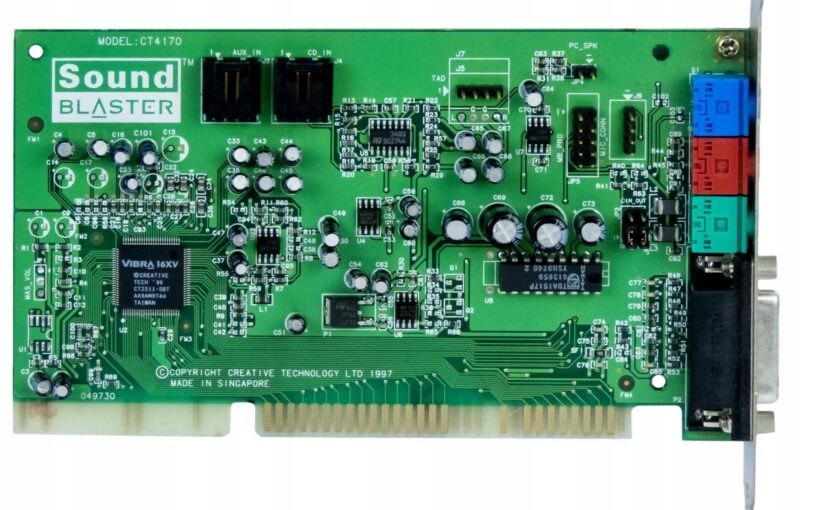
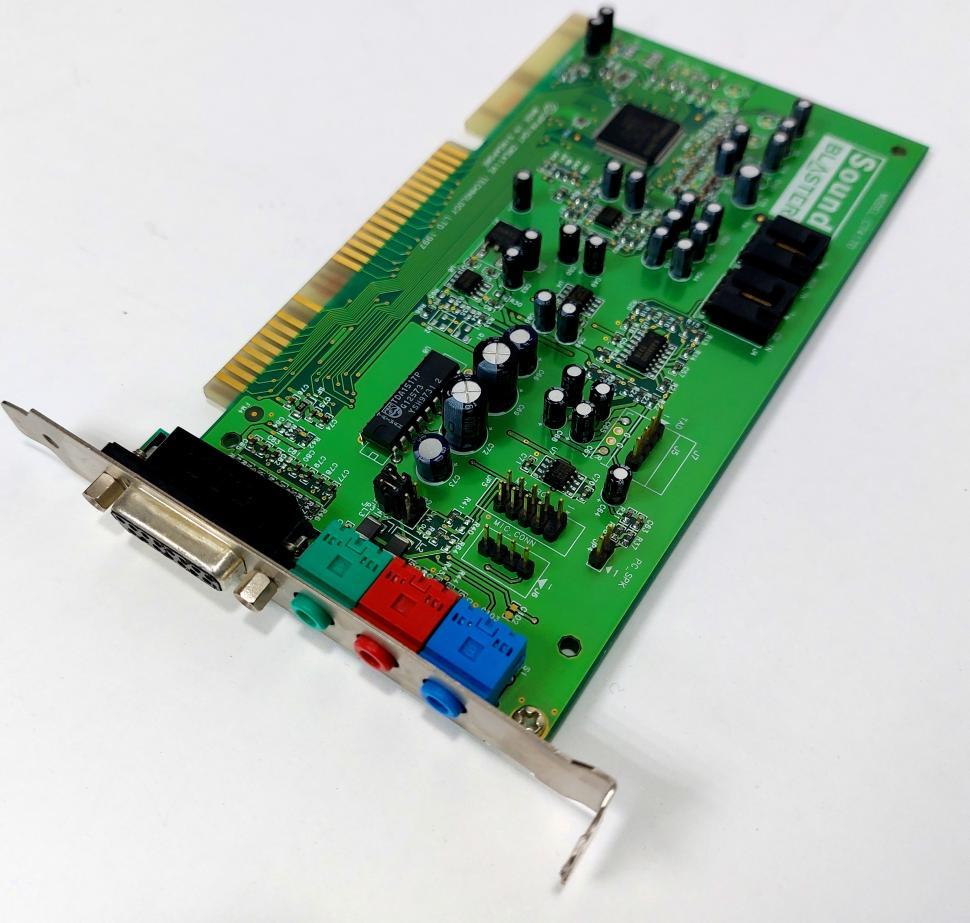
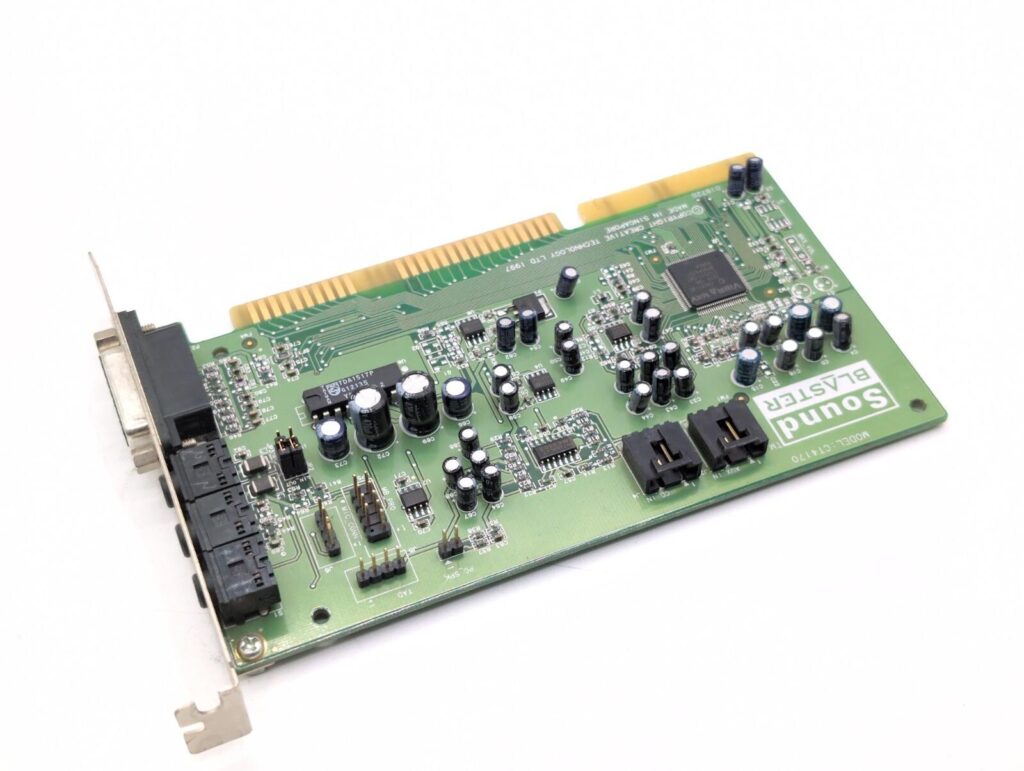
Sound Blaster CT4170 — цікава представниця пізнього покоління звукових карт Creative Sound Blaster для шини ISA. Вона належить до сімейства Sound Blaster 16, але вже істотно відрізняється від класичних SB16 початку 1990-х років.
CT4170 з’явилася приблизно у 1997 році та була орієнтована переважно на недорогі OEM-комп’ютери епохи Pentium і Pentium MMX. В її основі використовується чип Creative ViBRA 16XV CT2511.
Що таке Sound Blaster CT4170
CT4170 продавалася під назвами Sound Blaster 16 WavEffects та Sound Blaster 16 Value PnP. Це 16-бітна ISA Plug-and-Play звукова карта, розрахована на комп’ютери другої половини 1990-х років.
Основні можливості карти:
16-бітний цифровий звук;
стереозвук;
відтворення аудіо до 44,1 кГц / 16 bit;
сумісність із Sound Blaster, Sound Blaster Pro та Sound Blaster 16;
AdLib-сумісний FM-синтез;
MIDI-інтерфейс;
Game/MIDI Port;
Line In;
Mic In;
Speaker/Line Out;
CD-ROM та AUX audio inputs;
16-бітна ISA-шина;
ISA Plug-and-Play.
Для типового комп’ютера Pentium 100–233 MMX з Windows 95/98 та DOS-іграми це була цілком нормальна звукова карта свого часу.
Історія Sound Blaster 16
Щоб зрозуміти особливості CT4170, варто подивитися на розвиток сімейства Sound Blaster.
На початку 1990-х років Sound Blaster фактично став стандартом звукових карт для IBM PC-сумісних комп’ютерів. Поява Sound Blaster 16 принесла 16-бітний цифровий звук і зробила сімейство Creative ще популярнішим.
Ранні Sound Blaster 16 могли використовувати справжній Yamaha OPL3 для FM-синтезу. Саме OPL3 відповідав за характерну музику AdLib та Sound Blaster у багатьох DOS-іграх.
Однак до середини 1990-х років Creative почала активно здешевлювати конструкцію своїх звукових карт. У пізніших моделях замість Yamaha OPL3 почали використовувати власний CQM (Creative Quadratic Modulation).
CT4170 вже належить саме до цього періоду. Тому напис Sound Blaster 16 на карті є правильним з точки зору сумісності та позиціонування, але технічно це вже значно більш інтегрована та недорога конструкція.
CQM проти справжнього Yamaha OPL3
Для ретро-ігор це одна з найцікавіших особливостей CT4170.
CQM забезпечує програмну сумісність із OPL3 та AdLib, але технічно відрізняється від оригінального Yamaha OPL3. Через це музика в деяких іграх може звучати дещо інакше.
Залежно від конкретної гри можна почути:
інший тембр інструментів;
відмінності у FM-синтезі;
характерні високочастотні артефакти;
інше звучання окремих ефектів та інструментів.
Саме тому ентузіасти DOS-ретрогеймінгу часто віддають перевагу старішим Sound Blaster із реальним Yamaha OPL3.
Однак це не означає, що CT4170 погано звучить. Для таких ігор, як Doom, Duke Nukem 3D, Quake, Warcraft, Command & Conquer та багатьох інших, вона цілком придатна.
Що означає WavEffects
Назва WavEffects пов’язана з програмним синтезатором Creative. На відміну від AWE32 або AWE64, CT4170 не є повноцінною апаратною wavetable-картою з власною sample-пам’яттю.
Creative використовувала програмний WaveSynth, заснований на технології WaveGuide.
Тому між CT4170 та AWE32/AWE64 існує принципова різниця:
CT4170: SB16 + CQM FM + програмний WaveSynth.
AWE32/AWE64: апаратний sample-based синтез із власними можливостями відтворення семплів.
Особливості DMA та DOS-сумісності
У CT4170 є одна особливість, яка може мати значення під час використання старих DOS-ігор.
Карта не є повністю ідентичною класичному SB16 з точки зору реалізації DMA. Через це деякі старі програми та ігри, які очікують поведінку оригінального Sound Blaster 16, можуть вимагати додаткового налаштування.
Типова конфігурація Sound Blaster у DOS могла виглядати приблизно так:
A220 I5 D1 H5
де:
A220 — I/O address;
I5 — IRQ 5;
D1 — DMA;
H5 — high DMA.
Для CT4170 ситуація з high DMA дещо відрізняється від класичних SB16. Саме тому в окремих старих DOS-іграх можуть виникати проблеми або знадобитися специфічні налаштування.
Для якого комп’ютера призначалася CT4170
CT4170 дуже добре відображає типовий PC кінця 1990-х років.
Приблизно така конфігурація була цілком характерною для того часу:
Pentium / Pentium MMX → ISA → Windows 95/98 → Sound Blaster 16 → CD-ROM → активні колонки.
Особливо добре карта підходить для систем на базі:
Intel Pentium 100–166;
Pentium MMX 166–233;
ранніх Pentium II;
Windows 95;
Windows 98;
DOS 6.x / DOS 7.x.
Для 386 або 486 з чистим DOS вона вже не є настільки очевидним вибором. У таких системах старіший non-PnP Sound Blaster 16 або Sound Blaster Pro часто простіше налаштувати.
MIDI
CT4170 має MIDI/Game Port, але важливо розуміти його призначення.
MIDI-порт карти в першу чергу є MIDI-інтерфейсом, а не високоякісним внутрішнім MIDI-синтезатором рівня Roland.
Наприклад, до карти можна було підключити зовнішній MIDI-модуль на кшталт Roland Sound Canvas. У такому випадку CT4170 виступала інтерфейсом між комп’ютером і зовнішнім синтезатором.
Якщо ж потрібен якісний General MIDI без зовнішнього MIDI-модуля, AWE32, AWE64 або інші wavetable-рішення будуть значно цікавішими.
Якість звуку
Звучання CT4170 варто оцінювати окремо для цифрового аудіо та FM-музики.
Цифровий звук: цілком нормальний для свого часу — 16-бітний стереозвук із підтримкою частоти дискретизації до 44,1 кГц.
FM-музика: середня за мірками ретро-аудіо. CQM звучить інакше, ніж справжній Yamaha OPL3.
Шум та артефакти: як і багато недорогих Sound Blaster того покоління, CT4170 може мати фоновий шум, hiss та інші характерні для бюджетних карт артефакти. Водночас вона не є найгіршим представником сімейства ViBRA.
CT4170 серед інших Sound Blaster
Якщо дуже спрощено розташувати карти Creative тієї епохи за їхнім призначенням:
Sound Blaster Pro / ранні SB16 — старіші та простіші карти, особливо цікаві для DOS;
SB16 з Yamaha OPL3 — чудовий універсальний варіант для DOS;
CT4170 ViBRA 16XV — дешевший пізній SB16, особливо добре підходить для Windows 95/98 та DOS;
AWE32 — значно цікавіший варіант для апаратного MIDI та sample-based синтезу;
AWE64 — пізніша карта, добре пристосована до Windows 95/98 та General MIDI;
PCI Sound Blaster / Ensoniq — вже наступне покоління, яке не завжди так добре підходить для класичного DOS.
Чи варто використовувати CT4170 сьогодні?
CT4170 не є топовою Sound Blaster і не належить до найбільш цінних карт для колекціонерів. Проте це дуже характерна звукова карта кінця 1990-х років.
Для ретро-ПК вона може бути чудовим вибором, особливо якщо потрібно відтворити типовий комп’ютер 1997–1999 років.
Наприклад, конфігурація:
Pentium MMX + CT4170 + Windows 98 + Voodoo3
буде дуже автентичною для комп’ютера кінця 1990-х.
Якщо ж головна мета — створити максимально універсальний DOS-комп’ютер, який без проблем працюватиме з усіма старими іграми від AdLib до SB16, краще шукати Sound Blaster із реальним Yamaha OPL3.
Висновок
Sound Blaster CT4170 — це бюджетна, але цілком функціональна ISA-звукова карта другої половини 1990-х років. Вона являє собою пізній варіант Sound Blaster 16 на базі Creative ViBRA 16XV.
Її сильні сторони — хороша сумісність із великою кількістю DOS- та Windows-ігор, 16-бітний стереозвук, ISA Plug-and-Play та типова для епохи функціональність.
Головні компроміси — використання CQM замість справжнього Yamaha OPL3, бюджетна аналогова частина та деякі особливості сумісності з дуже старим DOS-софтом.
Тому CT4170 найкраще розглядати не як «погану дешеву Sound Blaster», а як характерний представник переходу від класичних DOS-звукових карт до масових Windows 95/98 PC.
Після встановлення чистого сервера Debian 13 одним із перших кроків має бути налаштування мережевої безпеки. Якщо доступ до сервера здійснюється виключно через SSH з використанням ключів, доцільно повністю закрити всі вхідні порти та залишити відкритим лише порт 22 для SSH.
У Debian 13 стандартним інструментом для фільтрації мережевого трафіку є nftables. Він входить до складу сучасних версій Linux і дозволяє гнучко налаштовувати правила фаєрвола.
Встановлення nftables
Оновіть список пакетів та встановіть nftables:
apt update
apt install nftables -y
Створення конфігурації фаєрвола
Відкрийте файл конфігурації:
nano /etc/nftables.conf
Вставте наступний вміст:
#!/usr/sbin/nft -f

flush ruleset

table inet filter {

    chain input {
        type filter hook input priority 0;
        policy drop;

        # localhost
        iif lo accept

        # вже встановлені з'єднання
        ct state established,related accept

        # SSH
        tcp dport 22 accept

        # ping (необов'язково)
        ip protocol icmp accept
        ip6 nexthdr icmpv6 accept
    }

    chain forward {
        type filter hook forward priority 0;
        policy drop;
    }

    chain output {
        type filter hook output priority 0;
        policy accept;
    }
}
Перевірка конфігурації
Перед застосуванням правил необхідно переконатися, що конфігурація не містить помилок:
nft -c -f /etc/nftables.conf
Якщо помилок не виявлено, можна активувати фаєрвол.
Дозволяють локальний трафік через інтерфейс localhost.
Дозволяють вже встановлені та пов’язані з’єднання.
Відкривають лише порт 22 для SSH.
Дозволяють вихідні з’єднання сервера.
Блокують пересилання пакетів (forward).
Перевірка відкритих портів
Після налаштування фаєрвола рекомендується перевірити сервер з іншого пристрою:
nmap -Pn IP_СЕРВЕРА
У результаті повинен залишитися доступним лише SSH-порт:
22/tcp open ssh
Додатковий захист SSH
Якщо ви підключаєтесь до сервера лише з однієї статичної IP-адреси, можна дозволити доступ до SSH тільки з неї.
Замість правила:
tcp dport 22 accept
використовуйте:
ip saddr 203.0.113.55 tcp dport 22 accept
де 203.0.113.55 необхідно замінити на власну IP-адресу.
У такому випадку SSH буде доступний виключно з вказаної адреси, а всі інші спроби підключення будуть автоматично блокуватися.
Важливе застереження
Перед застосуванням нових правил рекомендується відкрити другу SSH-сесію та не закривати її до завершення перевірки. Це дозволить уникнути втрати доступу до сервера у випадку помилки в конфігурації фаєрвола.
Most companies have an admin portal page, giving their staff access to basic admin controls for day-to-day operations. For a bank, an employee might need to transfer money to and from client accounts. Due to human error or negligence, there may be instances when these pages are not made private, allowing attackers to find hidden pages that show or give access to admin controls or sensitive data.
To begin, type the following command into the terminal to find potentially hidden pages on FakeBank’s website using (a command-line security application).
gobuster -u http://fakebank.thm -w wordlist.txt dir
The command will run and show you an output similar to this:
This guide explains how to classify network traffic in RouterOS running on MikroTik routers using Firewall Mangle.
The goal is to divide traffic into five logical directions:
LocalToGlobal – client traffic going to the Internet
GlobalToLocal – Internet traffic coming to clients
LocalToLocal – traffic between subscribers in the same network
LocalToMikrotik – traffic from subscribers to the router
MikrotikToLocal – traffic generated by the router to clients
This traffic model is very useful for Internet Service Providers and large
local networks because it allows:
bandwidth shaping using Queue Tree and PCQ
blocking client-to-client traffic
prioritizing management or service traffic
monitoring router-generated traffic
1. Network Concept
The following diagram represents the logical traffic directions:
Client → Internet      LocalToGlobal
Internet → Client      GlobalToLocal
Client → Client        LocalToLocal
Client → Router        LocalToMikrotik
Router → Client        MikrotikToLocal
To implement this architecture we will use two steps:
Mark connections
Mark packets based on those connections
2. Creating an Address List for Local Networks
First create an address list that contains all subscriber networks.
This list will be used to detect internal traffic.
This five-direction traffic classification model provides a flexible and
powerful framework for managing large subscriber networks on MikroTik routers.
By clearly separating Internet traffic, local traffic, and router traffic,
network administrators gain precise control over bandwidth usage, security,
and service prioritization.
Wireguard is a modern, fast, and secure VPN solution.
This guide explains how to create a new WireGuard client on a Linux server
(Debian or Ubuntu) and connect it from a mobile device or desktop.
Prerequisites
A Linux server with WireGuard already installed
Root or sudo access
An existing WireGuard interface (e.g. wg0)
Example network used in this guide:
VPN subnet: 10.0.0.0/24
Server IP: 10.0.0.1
New client IP: 10.0.0.2
Step 1: Generate Client Keys
Navigate to the WireGuard configuration directory and set a secure file creation mask:
cd /etc/wireguard
umask 077
Generate the client private and public keys:
wg genkey | tee client1.key | wg pubkey > client1.pub
This creates:
client1.key — private key (keep secret)
client1.pub — public key
Step 2: Add the Client to the Server Configuration
Scan the QR code using the WireGuard mobile app to import the tunnel instantly.
Step 6: Verify the Connection
On the server, check the tunnel status:
wg show
If the client is connected, you will see:
Latest handshake timestamp
Data transfer statistics
Common Configuration Variants
Split Tunnel (VPN only for internal network)
AllowedIPs = 10.0.0.0/24
Full Tunnel (all traffic via VPN)
AllowedIPs = 0.0.0.0/0, ::/0
Security Notes
Never reuse client IP addresses
Protect private keys with file permissions (600)
Use PersistentKeepalive = 25 for mobile clients behind NAT
Conclusion
WireGuard makes VPN client management simple and secure.
By following this guide, you can safely add new clients,
generate configuration files, and connect from any modern device.
This setup works equally well for Android, iOS, Linux, Windows, and macOS clients.
Creating a Telegram bot in PHP is a great way to automate tasks, provide customer support, send notifications, or build interactive services. Telegram offers a powerful and simple Bot API, and PHP makes it easy to handle web requests and responses.
In this step-by-step guide, you will learn how to create a Telegram bot using PHP, set up a webhook, and build a simple working example.
Step 1: Create a Telegram Bot with BotFather
Before writing any PHP code, you need to create your bot inside Telegram.
Open Telegram and search for BotFather.
Start a chat and send the command: /newbot
Follow the instructions and choose a bot name and username.
After creation, you will receive a Bot Token.
Save this token — you will need it to connect your PHP script to the Telegram Bot API.
Step 2: Set Up Your PHP Environment
To create a Telegram bot in PHP, you need:
A web server (Apache or Nginx)
PHP 7.4 or higher
HTTPS domain (Telegram requires SSL for webhooks)
Upload a PHP file (for example, bot.php) to your server.
Step 3: Basic Telegram Bot PHP Script
Below is a simple example of a Telegram bot written in PHP:
Use a framework for larger projects (Laravel, Symfony).
Store user data in a database (MySQL, PostgreSQL).
Use logging for debugging.
Secure your webhook endpoint.
Conclusion
Now you know how to create a Telegram bot in PHP using the Telegram Bot API and webhooks. With just a few lines of PHP code, you can build automated systems, chat assistants, and business tools.
Telegram bots are scalable, fast, and easy to maintain. As your project grows, you can expand your bot with inline keyboards, commands, databases, and third-party integrations.
Start building your PHP Telegram bot today and automate your workflow efficiently.
Huawei E173 — популярний USB 3G-модем, який добре підтримується Linux, але на сучасних версіях Linux Mint часто виникає ситуація, коли ModemManager не бачить модем, навіть якщо драйвери завантажені правильно.
У цій статті показано реальний робочий спосіб підключення Huawei E173 до Linux Mint, включно з діагностикою та стабільним рішенням через wvdial.
1. Перевірка визначення модема системою
Після підключення модема до USB перевіримо, чи бачить його система:
lsusb
Очікуваний результат:
Bus 001 Device 010: ID 12d1:1506 Huawei Technologies Co., Ltd. Modem/Networkcard
Важливо: ID 12d1:1506 означає, що модем уже в режимі модема (не CD-ROM), і usb_modeswitch не потрібен.
2. Перевірка портів ttyUSB
Модем Huawei E173 працює через послідовні порти. Перевіримо їх наявність:
PDO (PHP Data Objects) дозволяє змінити базу даних з MySQL на PostgreSQL без переписування PHP-коду, якщо код написаний правильно. Однак потрібно розуміти, що саме змінюється, а що — ні.
1. Головне правило
PDO прибирає залежність від драйвера БД, але не від SQL-діалекту.
✔ PHP-код зазвичай не змінюється
✔ змінюється DSN підключення
❌ SQL-запити та структура БД можуть потребувати адаптації